
Free Business Listing in Miami: How to Add or Claim Your Business
You are probably here for one of two reasons: your Miami business is already listed and you did not create the page, or you want another place for customers to find you without paying for it.
Either way, start here. A Miami Goes Local listing is free, with no card and no trial that expires.
This guide walks you through both paths: claiming an existing listing or adding a business that is not here yet. I’ll show you what information to prepare, what to keep consistent across Google and other directories, and which other listings are worth setting up first.
By the end, you should have one clean set of business details you can reuse everywhere.
First: Is your business already listed?
- Search Miami Goes Local for your exact business name before creating anything new. Also check for a misspelling, an old business name, or a listing tied to a previous owner.
- Duplicate pages are harder to fix later, so check first.
If you found it → Claim it
- Use the Claim this business option on the listing and follow the ownership confirmation steps.
Why is my business here if I never added it?
- Many unclaimed listings began with publicly available business information. That means the owner may never have seen or confirmed the page.
- That is what Unclaimed means. You can claim the page and correct it, or email us if you want the listing removed instead.
Before you start: the 5-minute checklist
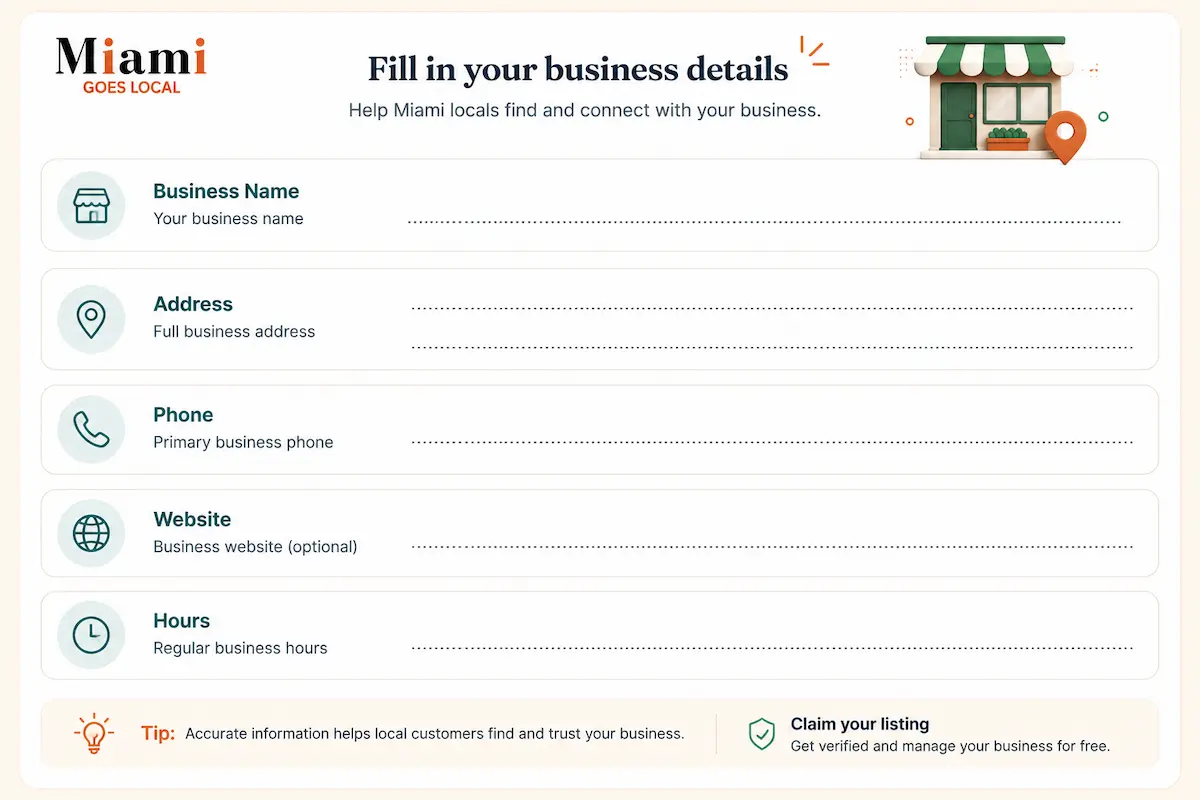
Have these details in front of you before you begin. You do not need professional photos, a marketing person, or a finished website to get started.
- Business name — required: Use the exact spelling you use on your signage and official business records.
- Address — required: Keep the format consistent everywhere, including suite or unit numbers.
- Phone number — required: Include the area code and use the number customers should actually call.
- Opening hours — required: Include different weekend or seasonal hours where needed.
- Services — required: List the main things customers can hire or visit you for.
- Business description — recommended: About 100–200 words is enough. Write it once, then lightly adapt it for Google and other directories.
- Website or social profile — optional: Add one if you have it. You do not need one to start.
- Photos — can be added later: Start with 3–5 real photos of your storefront, van, team, products, or work.
Use real photos when you can. A clear phone photo of the actual business tells customers more than a generic stock image.
Your Name, Address, and Phone master record
- Create one saved note with your exact Name, Address, and Phone number, plus your website URL. Copy and paste from that note every time you create or update a business listing.
Why this matters
- Small differences add up: Street vs. St., LLC vs. no LLC, Suite 4 vs. no suite number, or different phone numbers.
- Search engines compare business information across the web to understand whether records refer to the same real business. Google says local results are mainly based on relevance, distance, and prominence; consistent business details help keep that identity clear, but they are not a guaranteed ranking shortcut.
Pick one format and keep it
- Save:
- Business name:
- Address:
- Phone:
- Website:
- Then use that exact version everywhere.
- For Miami businesses, use your regular local 305 or 786 number when practical rather than changing between tracking, toll-free, and office numbers. If you use call tracking, make sure your main business number remains consistently associated with the business.
How to claim a listing that already exists
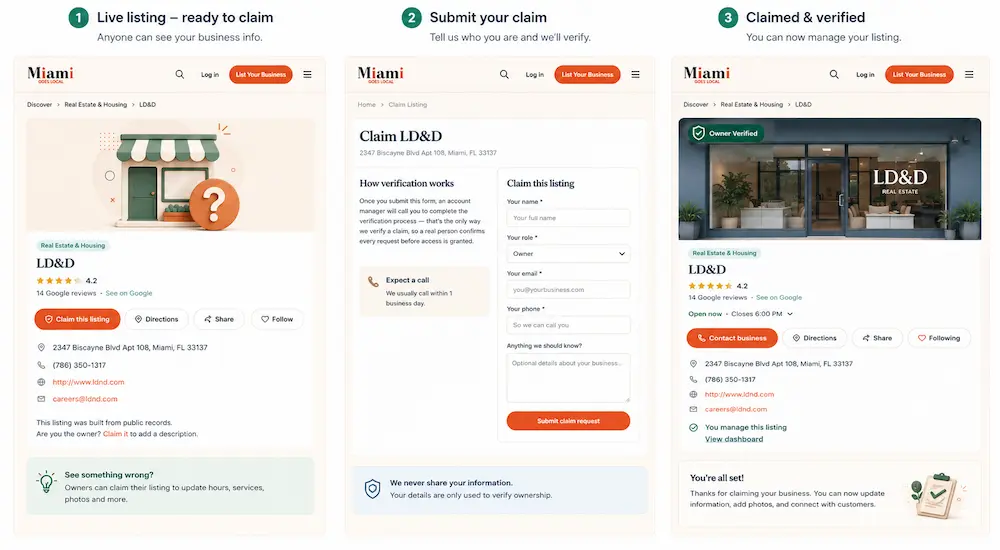
Step 1 Find your listingSearch Miami Goes Local using your business name. Check the address carefully if you see similar names.If you find your page, open it and select Claim Listing.
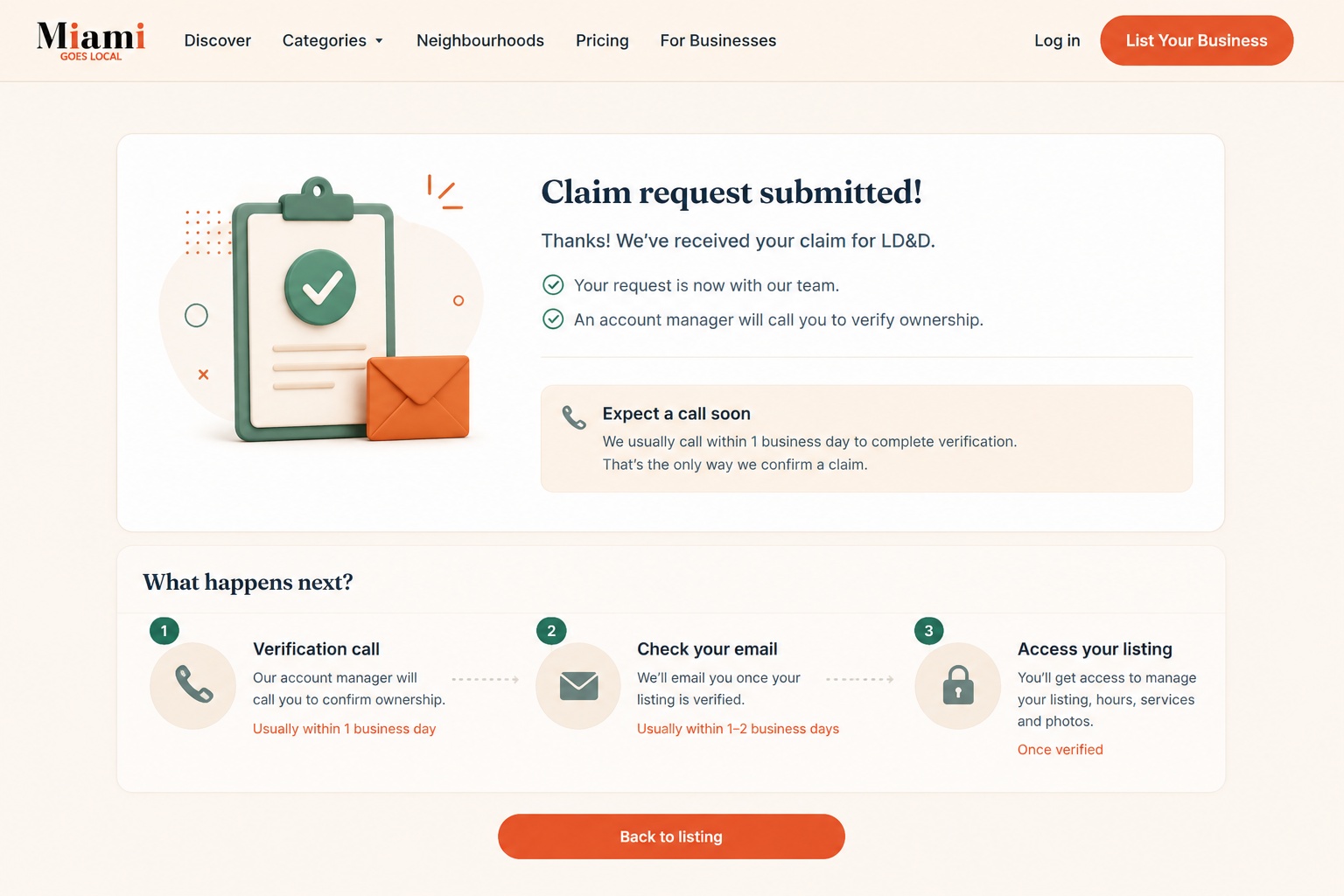
Step 2 Start the claimClick This is my business. You will be asked for your name, role, email address, phone number, and anything else we should know about the claim.Submitting the form does not automatically give you control of the page.
Step 3 Confirm you own or represent the business
After you submit the request, a Miami Goes Local account manager will call you. A real person completes the ownership check before access is granted.There is no charge for verification.
Step 4 Get control of the listingOnce the claim is approved, the page becomes owner-managed and can receive a Verified badge.
Verified means we confirmed the person controlling the page is connected to the business. IIt does not mean we rated the business, checked its professional license, or guarantee its work for that level of vetting on a general contractor specifically, see our ranked guide to the best general contractors in Miami.
Step 5 Fix the important details first
- Start with your phone number and address. A wrong number or old address can cost you a real customer.
- Then review your hours, services, photos, description, category, neighborhood, and other contact information.
How to add a business that isn't listed yet
Step 1 : Open the add form
Go to List Your Business and open the add form. It is free, requires no card, and takes about five minutes if you have your details ready.
Step 2 Add your business details
The form asks for your business name, owner or manager name, category, neighborhood, street address, ZIP code, phone, email, website, hours, services, and a short description. Business name, owner or manager name, street address, phone, and email are marked required on the current form.
Choose the narrowest category that accurately describes what you do a roofer, for instance, should list under our roofing contractor category rather than a broad general category that won't surface in relevant searches.
Put individual services in the services field rather than choosing a broader category just to cover more ground a roofer, for example, might list tear-off, tile installation, and repair separately, since pricing varies as much across those services as it does across roof types in our Miami roof replacement cost guide.
Step 3: Choose your neighborhood
Select the Miami neighborhood that best matches where the business operates. This helps your listing appear when people browse businesses by neighborhood as well as by category.
Step 4 : Finish the page after approval
Add a clear description and your main services before submitting. Photos and other listing details can be completed once you have control of the page.
Use real photos of the business, team, products, vehicles, or work whenever possible — a roofing company, for example, might show finished jobs across different roof types, the same systems compared in our tile vs. metal vs. flat roof guide.
Step 5 : Submit it
Select Submit business. Miami Goes Local currently states that new submissions are reviewed within 1–2 business days.
A Verified badge should only appear after ownership has been confirmed. Verification means the page is controlled by someone connected to the business; it is not a quality rating or license check.
Listing a home-based or mobile business in Miami
You don't need a storefront to be listed
- If you work from home or travel to customers, describe the areas you actually serve instead of pretending you have a storefront.
- Use neighborhoods people recognize Brickell, Little Havana, Coconut Grove, Coral Gables rather than a vague mileage radius.
- If you do not want your home address shown publicly, do not enter a fake address. The current Miami Goes Local form asks for a street address, so contact us before submitting if you need your listing handled as a home-based or mobile business.
Check the local rules for your home address
- A directory listing does not replace local business requirements. Miami-Dade says home-based businesses may still need a Local Business Tax Receipt. If the home is in unincorporated Miami-Dade, county zoning also requires an annual Certificate of Use for Home Occupation.
- If you are inside the City of Miami or another municipality, check that city's requirements as well. Miami-Dade notes that businesses inside a municipality may need both county and municipal business tax receipts.
- Confirm the current requirements directly with Miami-Dade County and your municipality before applying.
If you have no fixed premises
- Do not invent a storefront address just to complete a directory form. Tell us that you are mobile or service-area only, and list the neighborhoods you serve instead.
What Miami-Dade requires of you as a business
You do not need a business tax receipt to list on Miami Goes Local. But getting listed does not replace the licenses, tax receipts, or permits your business may need to operate legally.
Get your Miami-Dade Local Business Tax Receipt
Miami-Dade generally requires a Local Business Tax Receipt for each place of business and each separate business classification at the same location. If your business is inside a municipality such as Miami, Miami Beach, Coral Gables, Hialeah, Doral, or South Miami, you generally need both the municipal receipt and the Miami-Dade County receipt.
The county accepts new applications, renewals, and account changes through BTExpress. The Tax Collector currently says completed online applications are generally reviewed within 3–5 business days.
If you're inside the City of Miami
Check whether you need a Certificate of Use (CU) before applying for your City Business Tax Receipt. Most businesses with a physical City of Miami location need the CU first; some mobile businesses and businesses without a physical City location are exceptions.
Put September 30 on your calendar
Local business tax receipts run through September 30. A receipt not renewed when due becomes delinquent: Florida law sets a 10% penalty for October, then 5% for each additional month, capped at 25%. Operating without a required receipt can carry an additional 25% penalty.
Useful official starting points:
[Miami-Dade Local Business Tax / BTExpress] · [City of Miami Certificate of Use] · [Florida Sunbiz]
Requirements depend on your location and business type and can change. Confirm your own situation directly with Miami-Dade County and your municipality before applying.
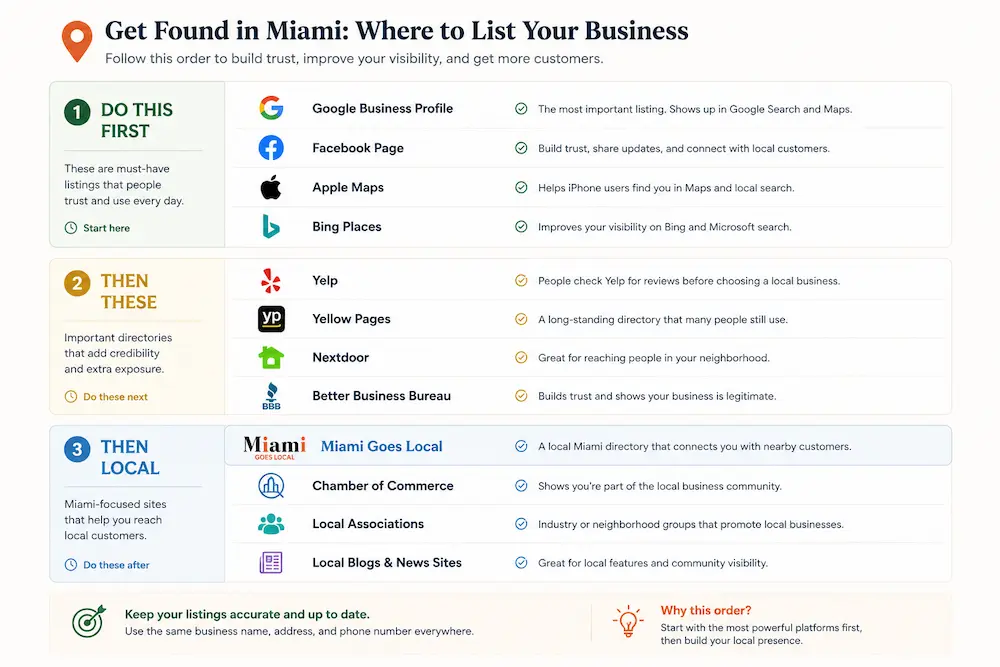
Where else to list, and in what order
- You do not need to submit your business to 50 or 100 directories. Start with the places customers already use, make those accurate, then add a few relevant local listings.
1. Start with Google Business Profile
- Before you do anything else, finish your Google Business Profile. It is free and controls how your business information can appear across Google Search and Maps.
- Check your business name, category, address or service area, phone number, website, hours, photos, and description. Google says complete and accurate information helps it match businesses to relevant local searches.
- Once those details are correct, use them as your working master and keep your other listings consistent.
2. Add the other major platforms
- Apple Business Connect: Free to manage and useful for controlling how your business appears across Apple Maps, Siri, and other Apple services.
- Bing Places: Claim or add your business for free, then confirm your hours, services, photos, and contact information.
- Facebook: If your customers use Facebook, keep your Page's address, phone number, website, services, and other business details current.
3. Then add a few relevant local listings
- After the major platforms are correct, add Miami Goes Local and any Miami or industry-specific directories that genuinely fit your business.
- A contractor restaurant, salon, and medical practice do not need the same directory list. Choose places customers in your category might actually use.
Fix before you add
- If Google, Apple, Bing, or another established profile shows an old address or wrong phone number, fix that first.
- Do not chase listing volume. A smaller set of accurate records makes it easier for customers and search engines to recognize the same business across the web. Google itself says local results are primarily based on relevance, distance, and prominence, and information from directories is one of the signals it can use when assessing prominence.
Is it really free? Here's exactly how this site makes money
Yes. A standard Miami Goes Local listing is $0 forever no card and no trial that later becomes paid.
What's free
You can claim and edit your listing, manage business details, add photos and hours, appear in your category and neighborhood, receive enquiries, and collect or respond to reviews without paying us.
What's paid
The only paid option is Featured placement: $29/month or $199/year.
Featured businesses rotate through homepage and category positions, rank above free listings in search, and receive additional listing features. The pricing page specifies a Featured badge on the listing and in search so paid placement is identifiable.
What money can't buy
Payment cannot buy:
- A Verified badge
- A better rating
- Inclusion in an editorial guide or ranked list
Verified comes from confirmed ownership, not payment. Ratings shown on claimed listings come from Google, not from how much a business pays Miami Goes Local.
Frequently asked questions
Is it really free? What's the catch?
Yes. A standard Miami Goes Local listing is free forever, with no card, contract, revenue share, or trial that converts to paid. The optional Featured plan costs $29/month or $199/year and adds paid placement and extra listing features.
Someone listed my business without asking me. Can I take it down?
Yes. You can claim the listing and correct it, or ask us to remove it without signing up for a paid plan.
with the business name and listing URL.
Do I need a business license to be listed?
No. Miami Goes Local does not require a business tax receipt before you can be listed.
Miami-Dade businesses may still need a Local Business Tax Receipt and other approvals depending on the business and location. See What Miami-Dade Requires of You as a Business above and confirm your requirements directly with the county.
Can I list a home-based or mobile business?
Yes, but do not invent a storefront address. The current add-business form requires a street address, so contact us before submitting if you are mobile-only or do not want your home address published.
Home-based businesses in unincorporated Miami-Dade may separately need an annual Certificate of Use for Home Occupation.
How long does verification take?
For an existing listing, the current claim page says a business-domain email can verify instantly; other claims go through manual review, and no fixed turnaround is currently published.
For a newly added business, Miami Goes Local currently states that review takes 1–2 business days.
Will this help me rank on Google?
An accurate listing can help search engines connect consistent information about your business across the web, but Miami Goes Local cannot promise you a Google ranking.
Finish your Google Business Profile first. Google says local results are mainly based on relevance, distance, and prominence, so this directory should support that foundation rather than replace it.
Do I need photos and a website to list?
No. Neither is required you can publish with the basics and add photos later. Expert Tip: Listings with real photos get engaged with far more, so come back and add them within the week.
What if my details change later?
Log in and edit changes go live immediately. Expert Tip: Re-check your core listings quarterly, and update everywhere immediately after any change to your phone, address, or hours. A seasonal hours change that never propagates is the most common cause of a wasted customer trip.
 Thanksgiving in Miami 2026: Independent Restaurants, Bakeries and Takeout That Are Open
 Best Plumbers Near Little Haiti, Miami How to Choose One You Can Trust
 Different Types of Massage in Miami: How to Choose by Goal, Price and Licence
